
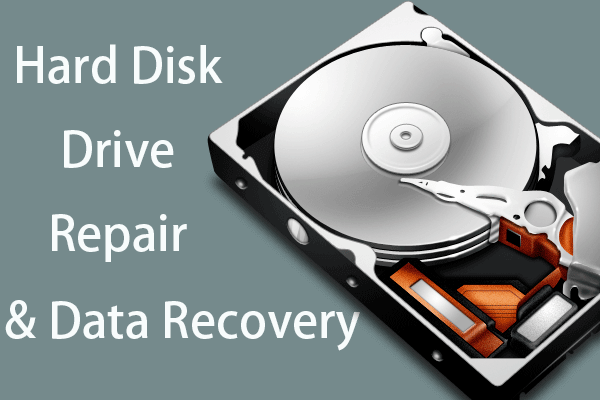
In the complex maze of our digital lives, data is the one constant that holds immense value - it forms the backbone of our personal memories, professional work, and essential services. As we delve deeper into this digital existence, the sanctity of our data becomes paramount, and its storage medium, typically the hard drive, becomes a sacred vault. But what happens when this vault crashes, threatening to wipe out this crucial data? It's a question that sends shivers down the spine of even the most seasoned computer user.
As an experienced computer repair center in Omaha, Nebraska, Heartland Computer has grappled with this scenario countless times. We understand the potential catastrophes that a hard drive crash can unleash and the ripple effect it can have on both individuals and businesses.
The Anatomy of a Hard Drive Crash
Before diving into the causes of hard drive crashes, it's essential to understand what a 'crash' actually means. In layman's terms, a hard drive crash occurs when the hard drive fails to function as expected. This failure can be abrupt, leading to a sudden loss of access to all data stored on the drive, or gradual, with the drive's performance deteriorating over time until it finally stops working. The triggers for such crashes can be broadly categorized into two types: physical/mechanical failures and logical/software issues.
Physical and Mechanical Failures
Physical damage to a hard drive can be sudden and catastrophic. Whether it's a drop, a knock, or a spill, any physical trauma can disrupt the intricate workings of the drive, causing it to crash. Mechanical failures are equally treacherous, involving the malfunction of internal components like the read/write head or the motor that spins the platters holding your data.
The Overheating Menace
One commonly overlooked culprit of mechanical failure is overheating. Your hard drive, like any other component of your computer, generates heat during operation. Without proper ventilation and cooling, this heat can build up, causing the drive's internal components to degrade faster. Persistent overheating can lead to premature wear and tear, ultimately causing the drive to crash.
Logical Errors and Software Issues
While the physical and mechanical aspects of a hard drive crash are relatively straightforward, the logical side of things is more elusive. Logical errors are software-related issues that make the hard drive unreadable, often without any signs of physical damage or mechanical failure.
The Role of Malware and Viruses
Malware and viruses represent a potent threat to hard drives. These malicious programs can corrupt data, damage the drive's firmware, or overwrite crucial sections of the drive, such as the boot sector. This not only renders the drive unusable but also makes data recovery incredibly challenging.
Fortifying Your Data Against Crashes
The stark reality is that no hard drive is immune to crashing. However, this doesn't mean that the loss of important documents is inevitable. Through diligent strategies and proactive measures, you can significantly minimize the risk of data loss.
The Power of Regular Backups
In the context of data protection, the importance of regular backups cannot be overstated. By regularly saving a copy of your data on a separate storage device or a cloud-based service, you ensure that you always have a fail-safe to fall back on in case of a hard drive crash.
Physical vs Cloud Backups
Choosing between physical backups (like external hard drives and USB drives) and cloud-based backups is largely a matter of personal preference and specific needs. Physical backups offer complete control over your data and don't depend on internet connectivity. However, they are susceptible to the same physical damages and failures as your computer's internal hard drive. Cloud backups, on the other hand, offer accessibility from anywhere and protection from physical damage but rely on a stable internet connection and the security measures of the service provider.
Harnessing the Power of RAID
The Redundant Array of Independent Disks (RAID) represents a sophisticated method of safeguarding data against hard drive failures. RAID systems store the same data in different places across multiple hard disks, effectively creating a built-in backup system. This makes RAID an excellent option for businesses and individuals who need a higher level of data protection.
System Maintenance and Updates
Just like a well-serviced car tends to have fewer breakdowns, a regularly maintained and updated computer system is less likely to experience a hard drive crash. Regular system maintenance, including cleaning your device to prevent overheating and conducting routine health checks on your hard drive, can significantly enhance the lifespan of your hard drive.
The Importance of Security Software
The right security software can act as a digital fortress, protecting your hard drive from the onslaught of viruses and malware. Regularly updating this software ensures you are shielded against the latest threats, adding another layer of protection against hard drive crashes.
Conclusion
In the world of computing, hard drive crashes are an unfortunate reality, an unexpected calamity that can lead to the loss of invaluable data. However, as we have explored in this guide, these crashes are not always the digital death sentence they are made out to be. With preventative strategies and the right knowledge, you can effectively mitigate the risk of losing your important documents.
At Heartland Computer, our aim is to arm you with this knowledge and provide the services you need to protect your data. Our comprehensive IT services, from data backup and recovery to computer networking and repair, are designed to offer you the best defense against hard drive crashes. So, whether you need help setting up a reliable backup system, or need assistance recovering data from a crashed drive, our team of certified professionals is here to help.
FAQs
What are the signs of a failing hard drive?
Signs of a failing hard drive can include frequent system crashes, slow performance, difficulty opening files, frequent error messages, and strange noises like clicking or grinding coming from the drive.
How often should I back up my data?
The frequency of backups depends on how often your data changes. For most users, a weekly or monthly backup is sufficient. However, if you work with important data that changes daily, you might want to consider a daily backup.
Can data be recovered from a crashed hard drive?
Yes, in many cases, data can be recovered from a crashed hard drive. However, the success rate largely depends on the severity of the crash and the damage to the drive. It's recommended to consult with professionals, like those at Heartland Computer, for data recovery services.
What is a RAID system and how does it protect my data?
A RAID (Redundant Array of Independent Disks) system stores the same data across multiple hard drives. This redundancy means that if one drive fails, the data is still available on the other drives, preventing data loss.
What should I do if my hard drive crashes?
If your hard drive crashes, don't panic. First, stop using the drive to avoid overwriting any recoverable data. Then, consult with a professional data recovery service like Heartland Computer.


















Join the conversation
Questions about this article? Ask below — our team reads every comment.