
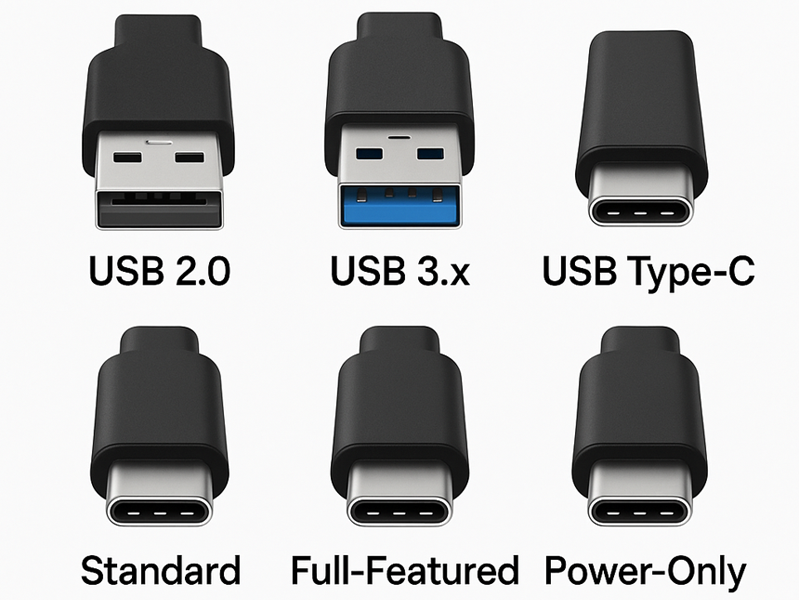
USB-C is a type of connector, like the reversible oval port found on most laptops and phones today. USB 2.0, 3.x, and USB4 are speed standards that can all share the same connector. Thunderbolt 3/4 follows the USB-C design but provides additional functions like daisy-chaining monitors. So, two devices can have the same-looking port but transport data at vastly different speeds; the port form alone does not indicate capabilities.
That mix-up is also the leading cause of consumers believing their laptop's USB port is "broken," when it is older, slower, doing precisely what it was designed to do.
What is USB Type-C?
USB-C is the connector, not a speed or a feature set. Its main advantages:
- Reversible - no more flipping the cable three times to find the right orientation
- One cable, multiple jobs - the same port can carry data, video (DisplayPort/HDMI), and power delivery
- Compact - thin enough for ultra books, tablets, and phones
The hitch is that a USB-C port might be running USB 2.0, USB4, or Thunderbolt beneath. Always verify the laptop's specifications, not just the port form.
USB 2.0 - still around, still fine for some things
USB 2.0 tops out at 480 Mbps and roughly 2.5W of power. It's not dead, it's just scoped down to:
- Keyboards, mice, and other low-bandwidth peripherals
- Basic device charging (older phones, Bluetooth headsets)
If you're attempting to backup a huge photo collection or run an external SSD over USB 2.0, that's your bottleneck, not a flaw.
USB 3.0 / 3.1 / 3.2 - the everyday speed tiers
|
Standard |
Max speed |
Power delivery |
Best for |
|
USB 3.0 |
5 Gbps |
Up to 4.5W |
Flash drives, external HDDs |
|
USB 3.1 |
10 Gbps |
Up to 15W |
External SSDs, docking stations |
|
USB 3.2 |
20 Gbps |
Higher, device-dependent |
Fast external storage, gaming peripherals |
When purchasing a cable or drive, refer to the Gbps number displayed on the box rather than the version label, as naming has been a source of confusion in the past (USB 3.1 Gen 1 vs Gen 2 vs 3.2 Gen 2×2).
USB4 and Thunderbolt 3/4 - the high-performance tier
Both max out around 40 Gbps and share the USB-C connector, but they aren't identical:
- USB4: up to 100W power delivery, DisplayPort 2.0 support for multiple 4K or single 8K displays
- Thunderbolt 3/4: same 40 Gbps ceiling, plus daisy-chaining (connecting several monitors or drives through one cable run) and guaranteed minimum bandwidth
If you're editing 4K/8K video, utilizing an external GPU, or driving dual monitors with a single connection, this is the tier for you; however, make sure your laptop's specific port supports it, as not every USB-C port on a USB4-era laptop is wired for full Thunderbolt speeds.
Quick comparison
|
Feature |
USB 2.0 |
USB 3.x |
USB4 / Thunderbolt |
|
Max speed |
480 Mbps |
5–20 Gbps |
Up to 40 Gbps |
|
Power delivery |
2.5W |
Up to 15W+ |
Up to 100W |
|
Video output |
None |
DisplayPort (3.1/3.2) |
DisplayPort 2.0, multi-monitor |
|
Typical use |
Keyboards, mice |
External drives, everyday transfer |
Video editing, eGPUs, docking |
When a "slow USB port" is a hardware problem
Not every USB issue is related to the standard you are using. If you encounter any of the following, it's worth ruling out a hardware error before thinking it's a cable or driver problem:
- A USB-C port that won't charge the laptop at all, even with a well-good charger
- A port that only works at an angle, or feels loose (often a sign of physical port damage)
- Devices connecting intermittently or dropping out under light movement
- A drive that shows up on one port but not another on the same laptop
These are frequent indications of a damaged or worn USB-C port, which is often caused by repeated cable insertion, drops, or liquid exposure. They are one of the most common laptops repairs we see, along with charging port and DC jack difficulties.
FAQ
Q. Is USB-C the same as USB 3.0?
No, USB-C identifies the design of the connector, whereas USB 3.0 describes a speed standard. A USB-C connector can support USB 2.0, 3.x, or USB4/Thunderbolt speeds, depending on the laptop.
Q. Is Thunderbolt faster than USB4?
They're both capped at roughly 40 Gbps, so raw speed is comparable. Thunderbolt offers daisy-chaining and guaranteed bandwidth, which ordinary USB4 may not always provide.
Q. Why does my USB-C port charge slowly or not at all?
Usually one of three things: an underpowered charger/cable, a laptop that limits charging speed on non-official chargers, or physical damage to the port itself. If a known-good charger and cable still do not function, a diagnostic check is recommended.
Q. Can I use a USB4 cable on a USB 3.0 port?
Yes, USB-C ports are backward compatible, however the connection will only be as fast as the slower device.
Q. Is your laptop's USB-C port not working?
If your charger, cable, and drives all work properly on another machine but your laptop still does not charge or identify USB devices, the port itself may be damaged. Heartland Computer provides a free diagnostic service and a 48-hour turnaround on laptop repairs for Dell, HP, Lenovo, Acer, ASUS, Microsoft Surface, and Apple MacBook, including USB-C port, charging port, and DC jack repair.
Start a Repair Request →
Book an Appointment →
📞 Omaha: 402-502-7040 | Council Bluffs: 712-256-8686



















Join the conversation
Questions about this article? Ask below — our team reads every comment.